Free Download Registered Softwares & Games Full Version. Blogger, Facebook & PC Tips & Tricks. Free Download Mobiles Softwares, Games & Applications and much more.
Articles by "Internet Tips or Tricks"
Showing posts with label Internet Tips or Tricks. Show all posts
Free Download Registered Softwares & Games Full Version. Blogger, Facebook & PC Tips & Tricks. Free Download Mobiles Softwares, Games
Internet Explorer New 100% Working Shortcuts
CTRL+A - Select all items on the current page CTRL+D - Add the current page to your Favorites CTRL+E - Open the Search bar CTRL+F - Find on this page CTRL+H - Open the History bar CTRL+I - Open the Favorites bar CTRL+N - Open a new window CTRL+O - Go to a new location CTRL+P - Print the current page or active frame CTRL+S - Save the current page CTRL+W - Close current browser window CTRL+ENTER - Adds the http://www. (url) .com SHIFT+CLICK - Open link in new window BACKSPACE - Go to the previous page ALT+HOME - Go to your Home page HOME - Move to the beginning of a document TAB - Move forward through items on a page END - Move to the end of a document ESC - Stop downloading a page F11 - Toggle full-screen view F5 - Refresh the current page F4 - Display list of typed addresses F6 - Change Address bar and page focus ALT+RIGHT ARROW - Go to the next page SHIFT+CTRL+TAB - Move back between frames SHIFT+F10 - Display a shortcut menu for a link SHIFT+TAB - Move back through the items on a page CTRL+TAB - Move forward between frames CTRL+C - Copy selected items to the clipboard CTRL+V - Insert contents of the clipboard ENTER - Activate a selected link HOME - Move to the beginning of a document END - Move to the end of a document
Free Download Registered Softwares & Games Full Version. Blogger, Facebook & PC Tips & Tricks. Free Download Mobiles Softwares, Games
Did you knew that your dear Torrent client uTorrent had a Tetris game Let See This Secret just go to help->about uTorrent when the about window opens just press ’ t ’ and Bingoooo. here comes a small tetris game for you to relish.
Free Download Registered Softwares & Games Full Version. Blogger, Facebook & PC Tips & Tricks. Free Download Mobiles Softwares, Games
All of us know very well that Torrent is the biggest platform for downloading stuff.We can easily download any type of file like movies,mp3,soft wares,games,videos and much more.
But there is a problem always with torrents as it download your file with the help of its own download system.This download manager slows your downloading speed and decreases up to fifty percents because The download speed of torrent depends on many factors like seeders,leeches,peers, Internet connection and much more.This is the major problem with torrents which all of us hates.
But what if we can download the same torrent file from IDM(Internet Download Manager)?I am sure all of you are much aware of IDM,the download manager which increases your downloading speed up to 200%.Yes its true we can easily download the same file using IDM.No,there is no need to perform the various operations like a programmer with different confusing codes.Its as easy as to surf the internet.So I am going to talk about these simple steps in this post.
How Is It Possible
The whole phenomenon is possible by using online tool called ZbigZ.com.By using which you will be available to download your torrents file in just a few clicks steps and within a minute.Also there was same site called Torrific.com but it gives some time server down problem.But the tool or site which I am going to explain here is another one which is free,fast and effective.
Advantages of downloading torrent files with IDM:
As I already mentioned above the feature of IDM here are some advantages of using IDM
IDm increases your downloading speed up to 200% or either you can say it it increases downloading speed 5 times that of your simple browser downloading speed.
Internet download manager speed does not depend on seeders,leeches etc,it only depends on your Internet connection. So, you can download torrent files with IDM without any difficulty.
If you are a student or employee and your office or school has high speed internet connection such as wi-fi,In most cases your wifi will be blocked by administrate.So this is the best solution for this kind of problem.
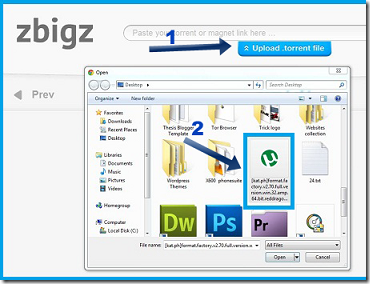
6.Then click on upload and choose the torrent file which you have downloaded previously then click on button Go.
7.Then a window will pop up asking for premium or free download.Choose FreeDownload.
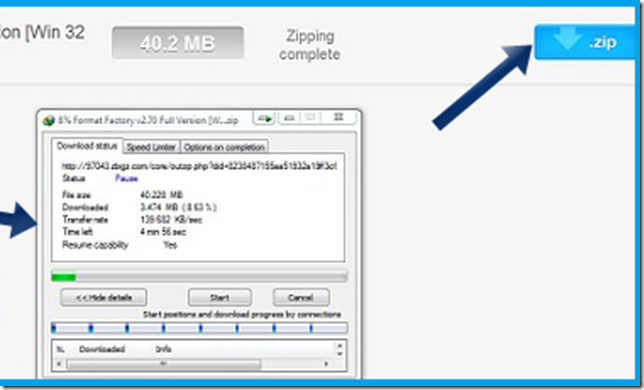
8.After choosing free your torrent file will be downloaded by high speed servers and your file will be ready to download(If its a large file then wait for few minutes)
Free Download Registered Softwares & Games Full Version. Blogger, Facebook & PC Tips & Tricks. Free Download Mobiles Softwares, Games
This Firefox tricks will improve the speed & load time of firefox. And you will be able to surf faster.
Type about:config in the address bar, Then look for the following entries, and make the corresponding changes. network.http.max-connections-per-server =32 network.http.max-persistent-connections-per-proxy =16 network.http.max-connections = 64 network.http.max-persistent-connections-per-server = 10 network.http.pipelining = true network.http.pipelining.maxrequests = 200 network.http.request.max-start-delay = 0 network.http.proxy.pipelining = true network.http.proxy.version = 1.0
Lastly right-click anywhere and select New- Integer. Name it nglayout.initialpaint.delay and set its value to 0. This value is the amount of time the browser waits before it acts on information it receives. Enjoy!!
Free Download Registered Softwares & Games Full Version. Blogger, Facebook & PC Tips & Tricks. Free Download Mobiles Softwares, Games
After trying all the methods available in the internet i was failed to increase uTorrent download speed maybe 1-2kb which is not worth of effort. But lucky me i got a great trick to double your uTorrent speed and this really works. Give it a try i am sure you will not be unhappy.
uTorrent: uTorrent is a software that lets you download files from multiple other people at once. Torrent technology is often faster than other forms of downloading since each user gives different parts of the same file to everyone else downloading the file. To increase the speed more just you need to do a few steps.
To start/perform this trick you have to download and install a software. Find the link below:
Free Download Registered Softwares & Games Full Version. Blogger, Facebook & PC Tips & Tricks. Free Download Mobiles Softwares, Games
Here are two ways to find your computer IP address:
First Way
If you have an Internet connection icon in the bottom right corner of the taskbar, you can double click this to open it.
Then choose the support tab at the top.
Your IP Address will be there.
Second way
Go to The Start Menu, then choose to open control panel.
Choose Network connections. (Choose Wireless Network for Wireless setups)
Right click on your internet connection icon and choose properties.
While you are there you should tick the box Show icon in notification area when connected.
Then from the list choose Internet Protocol (TCP/IP)
This is my Internet Protocol Properties box. I have chosen to Set my IP address to 10.0.0.1 and the default gateway is my modem IP address.
How to find your IP address for your computer in Windows Vista?
If you have a network icon in the notification area in the right hand corner of your taskbar then you can click on it.
This small box will appear. (below) Click on Network and sharing center link.
See more information on How to find your Router Configuration Web Page in Windows Seven.
Notes on how to find your computer IP address
See how to change your IP address in Windows Vista.
See how to change your IP address in Windows XP.
Your Ip address can also have 192.168.0.1. It just depends on how your Home Network is configured.
If You have the button checked that says to obtain an address automatically you can view your ip address by clicking on the internet connection icon in the right corner. Go to the support tab. Then you can find your computer IP address
Free Download Registered Softwares & Games Full Version. Blogger, Facebook & PC Tips & Tricks. Free Download Mobiles Softwares, Games
One of the most beneficial things you can do to boost your Wi-Fi, of course, is consider upgrading your wireless standard to Wireless N, if you haven’t yet. But if for any reason it is not an option for you, or if you want to prolong your older Wi-Fi box’s life, these 9 tips can help you out.
Place your Wi-Fi router near the center of the house on a high shelf, as far as possible from your neighbor’s Wi-Fi router, and make sure to use a channel different from your neighbor’s.
Keep router away from cordless phones and microwaves, which operate on the same frequency, unless your cordless phones is specifically Wi-Fi friendly if it uses other then 2.4 Ghz frequency
Keep items that interfere with radio reception as far as possible from your router antennas – items such as power cords, cable and computer wires. Actually, the computer case itself can be a significant barrier to the Wi-Fi signal. It would help if you position the case so it doesn’t come between the router antenna and a network card.
To increase the effective range, you can install an aftermarket antenna on your Wi-Fi equipment. However, because radio antennas only help concentrate and direct signals, the range of a Wi-Fi device is ultimately limited by the power of its radio transmitter rather than its antenna. For these reasons, signal boosting of a Wi-Fi network is sometimes necessary, normally accomplished by adding repeater devices that amplify and relay signals at intermediate points between network connections.
If you live or work on a single floor, consider adding an external antenna that uses higher dBi (decibels relative to an isotropic reference) called “high gain”. It may provide increased reception signal and performance. Since a higher dBi increases the signal horizontally, but decreases vertically; you may need to use a Wi-Fi amplifier to boost your signal, if you want to cover multiple floors.
Omnidirectional antennas are designed to work with signals in any directions, but their gain measured in any given direction is lower than directional antennas that focus in one direction only. If your building has some tight, hard-to-reach corners and you do not need 360° coverage, consider a Directional antenna.
Install a third-party firmware on your router. If your router supports it, third-party firmware, such as DD-WRT, can allow your to increase the power going to the antenna’s.
A WiFi repeater can be used to boost the signal between the router and your device. Take it a step further: install the open-source DD-WRT firmware on your old router, and make it into a repeater for your new one.
Reflectors can also be of benefit, with tuned placement of the reflector. Anything that looks like a parabolic reflector can be used, and should be placed behind the receiving device or antenna to achieve a significant increases in signal strength. This trick also works with cell phones!
Free Download Registered Softwares & Games Full Version. Blogger, Facebook & PC Tips & Tricks. Free Download Mobiles Softwares, Games
It's hard enough keeping your own PC secure without worrying about other computers. But if you do need to access the web, email or an important document on another computer, you need to be sure you're not compromising yourself by doing so. With a portable flash drive, you can build a collection of portable tools that will keep your data and identity secure, plus help you ascertain if that PC is safe to use. Note: If the target PC is infected your portable flash drive won't be able to protect you against any identity or data-stealing malware. If you have any doubts about the PC in question, don't use it. 1. Rohos Mini Drive Secure the contents of your flash drive from loss or theft by creating a special, hidden encrypted partition. Rohos Mini Drive lets you create an encrypted partition up to 2GB in size for free (upgrade for US$25 for unlimited space and other enhancements), and will run on PCs without requiring administrator privileges. For additional security, we recommend installing all of your portable apps to this encrypted partition. 2. Portable Firefox This comes as part of the PortableApps collection, and enables you to browse the web without worrying about leaving any tell-tale traces of where you've been: everything from your cookies to your browser history is stored on your encrypted volume. 3. Essential add-ons Once Portable Firefox is installed choose Tools > Add-Ons and install the following add-ons for increased security, privacy and convenience: Xmarks to synchronise bookmarks between your flash drive and other computers, Web of Trust to provide safety ratings for web sites and search engine results, and LastPass for secure password and form filling. 4. Portable KeePass This comes as part of the PortableApps suite - it doesn't offer the secure form-filling capabilities of LastPass, but it will store passwords for more than just Firefox. If you eschew Firefox in favour of another portable browser such as Opera@USB or Portable Chrome then it's a must. 5. Portable Thunderbird The biggest problem with using Portable Thunderbird for checking your mail is keeping it synchronised with your home PC - either leave a copy of your mail on the server after downloading it, or use IMAP if your account supports it to remain perfectly in sync. 6. Pidgin Portable This lightweight instant messaging tool boasts compatibility with all major IM protocols, including Yahoo!, AOL and Windows Live/MSN, so you can chat from any PC. If you and your mate install one of the two encryption plug-ins you can chat securely too. 7. Clamwin Portable If you want to scan the PC you're working on for possible infection before using it, the portable version of this open-source tool can be run and set to scan for nasties. Remember, no security tool is infallible, but it'll give you a headstart. 8. a-squared HijackFree Once installed directly to your flash drive (don't create any shortcuts when prompted), you can use this app to take a closer look at the PC you're using. You'll need administrator privileges to do so, but if you pass muster you can take a look at running processes, Services and take a peek into areas of the PC where infections are likely to occur. 9. Portable Applications The Portable Applications suite includes many of the tools already mentioned, but because it's not updated as regularly as individual applications you might prefer to install just the core version and then download the apps themselves separately. If you're worried about what temporary files might be created when working on a host PC's own installed applications, use your own instead. Take a look at the growing number of portable Office and viewer apps out there: AbiWord, OpenOffice, Sumatra PDF Portable, and VLC Media Player Portable are just four examples. 10. Eraser Portable If you end up using your host PC's hard drive to store files on, you may want a means of securely shredding that data when you've finished; Eraser Portable will do the job, but avoid using it on your own flash drive's files (if your data is stored on your encrypted partition it's not required anyway).
Free Download Registered Softwares & Games Full Version. Blogger, Facebook & PC Tips & Tricks. Free Download Mobiles Softwares, Games
Watch a Hollywood film and it'll depict hackers as fast-talking American kids – pale faced, coke swilling, super-smart and capable of doing the impossible. This is, of course, a fiction. If you were a career computer criminal, would you choose to base yourself in a country with mature computer crime laws and strong-arm enforcers? No. You'd want to be somewhere comparatively lawless. If you're looking for hackers, look east – towards China and Russia – and you'll be barking up the right tree. That's what the analysts say. But even here myths and rumours get in the way. The Berlin Wall may have fallen but the KGB is still alive and clicking. Beijing has an army of hackers eyeing the West's data. Stories of dark doings and espionage at the keyboard abound. The truth, however, is hard to come by. Take Russia. While there's no doubt that the ex-Soviet state is genuinely computer-savvy, is there any hard evidence that it poses a greater threat to your PC than, say, South America? In case you're wondering, Brazil is regarded as a leader in banking trojan technology. Are the Russians phishing like there's no tomorrow? Or are security firms reviving Cold War paranoia in the hope of making 'the enemy' look bigger and uglier, all in order to sell us antivirus software? The code war Boris Miroshnikov seems almost proud of the criminals that he chases through cyberspace. He's a Lieutenant General with the Russian police's Department K, which fights domestic cybercrime. Speaking at the 2005 E-crime Congress in London, Miroshnikov told delegates: "Our software writers are the best in the world; that's why our hackers are the best in the world." "You're right in thinking that Russia and Eastern Europe are playing a big role in organised webcrime," says Con Mallon, Symantec's Product Marketing Director for Europe, the Middle East and Asia. "Information made public by various arrests of underground economy groups suggests that groups in Russia and Eastern Europe are more organised and professional operations, and that they also possess greater abilities and manufacturing facilities to mass-produce physical credit and debit cards." Many Russians have been convicted for cybercrime in the past decade. Vasiliy Gorshkov and Alexey Ivanov are from Chelyabinsk, 75 miles from the Kazakhstan border. In 2001, the FBI tricked them into visiting the USA, where they were arrested and charged with 20 counts of conspiracy, fraud and other offences. In 2004, Department K broke up a criminal gang that had extorted money from nine British bookies, causing a total of over £45million in lost business. And after extorting more than £2million from British companies in 2006 using distributed denial of service (DDoS) attacks, Ivan Maksakov, Alexander Petrov, and Denis Stepanov were convicted after an international effort by Interpol, the FBI and the UK's now-defunct National High-Tech Crimes Unit. During their six-month spree, the gang launched over 50 blackmail attempts in 30 countries. When UK based bookmaker CanBet Sports refused to pay the $10,000 demanded, the subsequent DDoS attack saw the company lose around £100,000 per day. In May 2007, Estonia came under a concerted botnet DDoS attack that knocked out the tiny Baltic state's government, media and business websites, halting its largely web-based banking systems. Similarly, during the Russian invasion of Georgia last year, hackers poured DDoS traffic into the troubled country in order to knock out its infrastructure. But were these hackers Russian? Reasonable doubts Ken Munro is Director of the Penetration Testing Division of the National Computer Centre (NCC). "The people who do use botnets are extortionists, and we know there are huge volumes of compromised machines out there, synchronised, ready to run, and you can point them wherever you like," he says. "Who's to say that [the Georgian attack] wasn't another foreign power trying to undermine the Georgian government, and it just happened to coincide with the Russian attack?" The problem with botnets is that the infected computers could be anywhere. As a result, it's difficult to quantify the amount of cybercrime originating from Russia. "I'm not going to give you a figure," says Munro. "The problem with all these things is that no one genuinely knows. And even with vendors who give you numbers, all they're relying on is what they perceive to be the source IP addresses. That means absolutely nothing, because anyone could use an open proxy on a compromised machine and relay their traffic to any other system in the world." Even if you trace malicious traffic back to a single machine, it might not be the real source. "It could be some poor home user who's got an XP system sat there on the internet and doesn't know they're being used as a back door," confirms Munro. "So, there's almost no confidence in the statistics." There's no denying that press reports of Russian hacker convictions are true and that they're on the rise, but there have also been plenty of non-Russian convictions over the last decade. Some of the crimes perpetrated by US and non-Russian European hackers have been very sophisticated. Take Gabriel Bogdan Ionescu, for example. He's a 22-year-old Romanian currently serving three years in an Italian prison for setting up a cloned copy of the Italian Post Office's website and siphoning off money in a sophisticated phishing scam. Meanwhile, in the US, Robert Moore was convicted of what, to most people, looked like an ingenious scheme to steal VoIP services and sell them through a second company. In an interview before he was due to start a two-year prison sentence, he described what he had done as being "so easy a caveman could do it". In all, Moore broke into 15 telecommunications providers and "hundreds" of private companies. And Kiwi hacker Owen Walker, who was convicted in April 2008, managed to create a botnet of 1.3 million compromised computers as his part of a large online crime ring. The botnet was used to siphon off millions of dollars from unsuspecting users' bank accounts. The now-infamous Estonian DDoS attack of 2007 was initially linked to the Russian government by the press. However, a subsequent investigation revealed that it had been perpetrated by an impromptu 'flashmob' who were angry at the removal of a Russian war statue in the Estonian capital Tallinn. Though the first person to be convicted of the attack, Dmitri Galushkevic, was Russian by birth, he lived in Estonia and attacked from within.
Free Download Registered Softwares & Games Full Version. Blogger, Facebook & PC Tips & Tricks. Free Download Mobiles Softwares, Games
Facebook doesn't share information with anyone,so there is no option to export the email ids of all your friends.There is a perfectly legal way to do so.
Disclaimer: This is not a hacking tutorial.Using Yahoo importer you can download email ids of all your Facebook friends
Steps to import email ids of all your Facebook contacts:
Go to address.yahoo.com and below you will find a tool "Import your Contacts from other accounts to Yahoo!"
Click on import now
Click on the Facebook icon.now a dialog box will pop out asking you whether you want to share your contacts with yahoo.select okay
It will start retrieving data from Facebook.after its completed click on done.
Click on tools option and select export or you can directly go to Export Contacts
There are various ways to Export.select your preferred method.
Facebook has finally started filling up the missing blanks on their social network as an answer to Google Plus Project. Together with Skype, Facebook has launched its first ever Video Calling option on there website. Facebook Users can now not only chat but they can now see their loved ones smile, wink and say lol face to face! So far there are no latency issues and video calling loads faster and works without pauses or any other pros. You don't need to install any software or application to make this function work. Below you will find some useful Facebook video calling tips.
Update: We just published an alternative method that works perfectly. Check this: Chat with Facebook
friends via Skype
How do I set up video calling?
To start a video call with a friend you will first need to complete a quick, one-time setup:
To call a friend, click the video icon at the top of your chat window.
Simply click the “Set Up” button and follow the easy instructions for how to set up video calling on your favorite browser.
Once installed successfully the video call will start automatically or you can ring back your friend by clicking the video call button at the top right corner of your friends profile
How do I start a video call with a friend?
After the one-time set up you are now ready to make your first call:
Visit your friend’s profile and click the “Call” button in the top right corner. You can also click the video icon at the top of the chat window.
When your friend answers, be patient and wait for sometime till both your web cams are inter connected.
If your friend is unavailable or offline, you can leave a video message. That's indeed more like Yahoo's Voice service.
For all these steps to correctly work you must make sure that both your webcam and microphone are connected to the right slots and are in a running condition. You can still use video calling even if you don't have a webcam. You will be able to talk to and see your friend but your friend will be able to hear your voice only.
Free Download Registered Softwares & Games Full Version. Blogger, Facebook & PC Tips & Tricks. Free Download Mobiles Softwares, Games
25 internet security tips
Only The Paranoid Survive is a tract on corporate fundamentals penned by Intel's ex-Chairman Andy Grove. The words should, however, be tattooed on the back of every PC owner's mouse hand. The internet is full of thieves and vagabonds united by one common goal – to separate you from your hard-earned cash. Here's our guide to staying one step ahead of the bad guys. Follow our internet security tips to stay safe online and you can shop, surf and socialise online, and sleep soundly afterwards too. 1. Guerrilla psychology Don't be fooled into thinking cyber crime is a technical problem with a purely technical solution. A firewall and antivirus software can protect your computer, but they won't keep you and your identity safe. Social engineering is the black art of influencing people, and it's the hacker's best friend. In essence, hackers can control us thanks to a refined understanding of human characteristics such as trust, ignorance, greed, the need to be liked, the desire to help and plain old gullibility. Not even the most sophisticated software can hope to protect us from ourselves. In order to stay safe, educate yourself about social engineering. Take a trip to the Symantec website for a brilliant briefing on the subject. If you get keen, check out The Art of Deception: Controlling the Human Element of Security by Kevin Mitnick. 2. Avoid being a mule Working from home, earn £500 a week commission. It sounds to good to be true, and it is. Scammers pass stolen cash to unsuspecting people, who transfer it back to the thieves via electronic payment. Your job with the work taken out is money laundering. Beware. 3. Set a serious password If you're struggling to create passwords that will stump a hacker, check out Microsoft's guide to adding complexity to access codes in such a way that you can still remember the logon. When you've made a password, you should rate its relative security. Microsoft offers an excellent password checking tool, which can be found here. 4. Split your emails Rather than linking Facebook, Twitter, newsgroups, forums, shopping and banking sites to one email address, use multiple addresses. As a minimum, use one for social activities and one for financial business. Your social address will rightly draw more attention than your business one – that's the way you want it to be. If the former is hacked, it won't be as nightmarish as losing control of your financial address. 5. Take care on public networks Never, under any circumstances, use a public network for financial transactions. Only send your personal and financial details over a network you've set up yourself, or one you know to be secure. Who knows what horrors are lurking on the hard disk of that internet cafe machine, or somewhere between it and its internet access point? Hackers have also been known to set up laptops to broadcast networks with names such as 'Free Internet Access' in hotels. They'll let you pass internet traffic through them and harvest any juicy details as you type. 6. Virtualise The truly paranoid should virtualise. The idea is simple: create a virtual PC, use it to surf the internet and, when you've done, destroy it, along with any viruses that may have infected it while you were online. Running a virtual version of Ubuntu from within Ubuntu is likely to be the easiest way of achieving this style of computing, and it's likely to be very safe too. 7. Anatomy of an iffy shop By making online shops look slick, official and safe, online criminals hope to dupe us into disclosing credit card details. Fake shopping sites, like much online criminality, rely on social engineering. There are, however, some tell-tale signs that should help you spot an iffy shop. First, avoid sites that ask for cash, cheque or virtual cash payments only – only do business with sites that accept credit cards. Next, ensure that the shop has a physical address, ideally in the UK – shopping abroad throws up more potential problems. 8. Be wary of Facebook There are two key areas of social networking security – the technical sphere and the human one. Technical security is about setting up your profile correctly – your favourite site will explain how, so follow its guides. Next is the human aspect of security and our old friend, social engineering. No quantity of settings and checkboxes can prevent a user from willingly complying with the bad guys, and this is what they depend on. There's one simple rule to follow here: don't do or say anything online that you wouldn't do or say in real life. 9. A price on your identity If you're in doubt about the value of your credentials, visit www.everyclickmatters.com/victim/assessment.html. Complete the questionnaire and discover what you're worth to a scammer… 10. Beware geeks bearing gifts Social engineering can be our worst enemy when it comes to making us run malware installers. On the day StarCraft II was released, security firms reported a huge number of warez downloads for the game that were really wrappers for viruses. On the day Michael Jackson died, sites sprang up claiming video exclusives of the singer's last moments. Again, these were links to malware. Employing the lure of a hot topic as a means of walking us towards malware is a common hacker tactic. When you're tempted to click a link, follow the old mantra: if something sounds too good to be true, it probably is. 11. Choose your flexible friend Never be tempted to use or enter details from your debit card – always use a credit card. Section 75 of the Consumer Credit Act (1974) make credit card companies liable to pay if you're the innocent victim of fraud. Card companies may, however, avoid paying out if you're proved not to have taken 'reasonable' care with your card – doing something like writing down your PIN, for example. Credit cards themselves also offer different levels of fraud insurance, so shop around before choosing a card and make sure you read the terms and conditions closely. 12. Pump and dump Don't be tempted to follow unsolicited dead-cert share tips. The senders will probably hold a lot of them. When you and other victims buy, the price will go up. They'll then sell, leaving you holding the baby. 13. Just like that A common online action site scam is to sell goods that are 'like' top brand goods. Your new watch may be like a Rolex insofar as it ticks, but that could be your lot. 14. Act on your doubts If you think an online shop or service is dodgy, do some checking. A WHOIS search may let you see the registration details of a site. Visit the website www.whois.net and check out your suspect site. Companies House also enables you to check out details about company addresses, owners and the like. Look for big discrepancies between onscreen addresses and physical offices. 15. We've found a virus Bogus security experts call unsuspecting PC owners claiming they've found a virus on their hard drive. All you need do is pay a fee and they'll remotely remove the nasty. In reality, the scammers are just working through phone lists, planting the seeds of fear and then collecting bucketloads of cash. 16. Ditch IE6 If you're still using Internet Explorer 6, shame on you. Not only are you likely to be getting less from the internet – Google and YouTube have now stopped supporting the ageing browser – but it's also riddled with security flaws. Do yourself a favour and download a newer browser. 17. Check out Virus Total If you've received a file and are worried about its provenance, upload it to www.virustotal.com. The site will run the file through a number of virus-scanning engines to find any hidden malware. It'll also send you a handy report document. 18. Listen to Bruce Schneier Renowned security expert, blogger and self-styled security guru Bruce Schneier has a thing or two to say about every aspect of the topic, ranging from the virus right up to national security policy. Visit his blog at www.schneier.com and add it to your bookmarks. 19. Check firewall logs Firewalls keep logs of traffic they've rebuffed. Check these and look for patterns – maybe a particular IP address is pinging your network or a certain port on your setup is spewing out too much traffic. These sorts of things can suggest a viral infection. 20. Stop redundant services The more software and services you're running, the greater the risk you could be compromised. Be ruthless – delete or deactivate applications and services you don't use. This will reduce the number of ways into your machine that are available to hackers. 21. Be cautious If you must use file sharing, do so with the utmost paranoia about security. When you've downloaded a file, isolate it and, if possible, execute it from a virtual environment to ensure it's safe before letting it into your true computing environment. 22. Update software Windows 7 and most major apps are happy to update themselves automatically, but you should still run their update systems manually to ensure they're working. Smaller apps may need updating manually, so check their makers' sites for updates. 23. Enter your own URLs Never follow links to URLs emailed to you and don't Google your bank's address. Google can be tricked into moving spoof sites up its rankings table by criminals looking to entice people to sites designed to harvest logon details. Enter important URLs yourself. 24. Check site safety Download McAfee's excellent SiteAdvisor from www.siteadvisor.com. The browser plug-in has a traffic light system that shows dangerous sites in search results. Following its green, yellow and red site rating icons will help you to avoid compromised web locations. 25. Test your system Test your antivirus system using the Eicar string. It's a text file that all antivirus engines should pick up, no matter how it's wrapped or compressed. Get it from www.eicar.org. It's completely safe and won't land you in legal hot water.